Building Custom Tree
Note
This section is primarily designed for advanced users who need to quickly implement their own custom trees, typically for research purposes or other specific requirements. It is intended for those who need to manually define their tree structures.
Warning
The load_tree function operates in an unsafe manner. It does not perform input validation or buffer indexing checks. This means users must ensure their inputs are correctly formatted and free of errors to avoid critical issues.
The structure of a tree in an obliquetree is as follows:
{"params": {}, "tree": {}}
This simple and flexible structure allows users to quickly build custom trees tailored to their needs.
Explanation of "params"
In the output of obliquetree.export_tree function, "params" key contains several parameters, but the mandatory ones required to create a custom tree are:
{
    "params": {
        "task": false,
        "n_classes": 2,
        "n_features": 5
    }
}
task: Specifies the type of task.true: Indicates a regression task.false: Indicates a classification task.
n_classes: Specifies the number of classes in the target variable.Regression (
task: true):n_classesis set to 1, as regression does not involve multiple classes.Classification (
task: false):n_classescorresponds to the number of classes in the target variable.
n_features: Specifies the total number of features (columns) in the input dataset.
Explanation of "tree"
In the "tree" structure, you have the flexibility to include optional properties like n_samples (number of samples in a node) and impurity (a measure of the node’s impurity). However, these are not mandatory for defining the tree.
1. Axis-Aligned Split Node
For a feature index \(i\) and threshold \(t\):
Decision function: \(f(x) = x[i] \leq t\)
Traversal logic:
Go to the left child if \(f(x)\) is true.
Go to the right child if \(f(x)\) is false.
Explanation:
is_leafset tofalse.is_obliqueset tofalse.feature_idxspecifies the index of the feature used for splitting.thresholdis the value compared against the feature. If the feature value is less than the threshold, traversal proceeds to the left child.missing_go_leftdetermines the direction when the feature value is missing. Iftrue, traversal goes left. Iffalse, traversal goes right.
{
    "is_leaf": false,
    "is_oblique": false,
    "feature_idx": 0,
    "threshold": -1.32,
    "missing_go_left": true,
    "left": {},
    "right": {}
}
2. Oblique Split Node
For a weight vector \(w \in \mathbb{R}^k\) and feature indices \(F = \{f_1, \dots, f_k\}\):
Decision function: \(f(x) = \sum_i (w_i \cdot x[f_i]) \leq t\)
Traversal logic:
Go to the left child if \(f(x)\) is true.
Go to the right child if \(f(x)\) is false.
Explanation:
is_leafset tofalse.is_obliqueset totrue.weightsspecifies the coefficients for the linear combination of features.featureslists the indices of the features used in the linear combination.thresholdis the value compared against the linear combination. If the result is less than the threshold, traversal proceeds to the left child.
{
    "is_leaf": false,
    "is_oblique": true,
    "weights": [-0.04, -1.0],
    "features": [4, 10],
    "threshold": -0.87,
    "left": {},
    "right": {}
}
3. Categorical Split Node
For a feature index \(i\) and category set \(C\):
Decision function: \(f(x) = x[i] \in C\)
Traversal logic:
Go to the left child if \(f(x)\) is true.
Go to the right child if \(f(x)\) is false.
Explanation:
is_leafset tofalse.is_obliqueset tofalse.category_leftspecifies the set of categories that lead to the left child.feature_idxidentifies the feature used for the categorical split.missing_go_leftbehaves the same as in other nodes.
{
    "is_leaf": false,
    "is_oblique": false,
    "feature_idx": 7,
    "category_left": [1, 2, 3, 4],
    "missing_go_left": true,
    "left": {},
    "right": {}
}
Leaf Node Structure
Binary Classification
Explanation: In binary classification,
valuerepresents the probability of the positive class (\(p\)).
{
    "is_leaf": true,
    "value": 0.75  // [0, 1], probability of positive class
}
Multi-class Classification (\(K\) classes)
Explanation: In multi-class classification,
valuesis an array where each entry corresponds to the probability of a class. The probabilities sum to 1 (\(\sum p_i = 1\)).
{
    "is_leaf": true,
    "values": [0.25, 0.5, 0.25]  // values[i] in [0,1], sum(values) = 1
}
Regression
Explanation: In regression tasks,
valueis the predicted continuous numeric value.
{
    "is_leaf": true,
    "value": 42.5  // predicted value
}
Complete Example
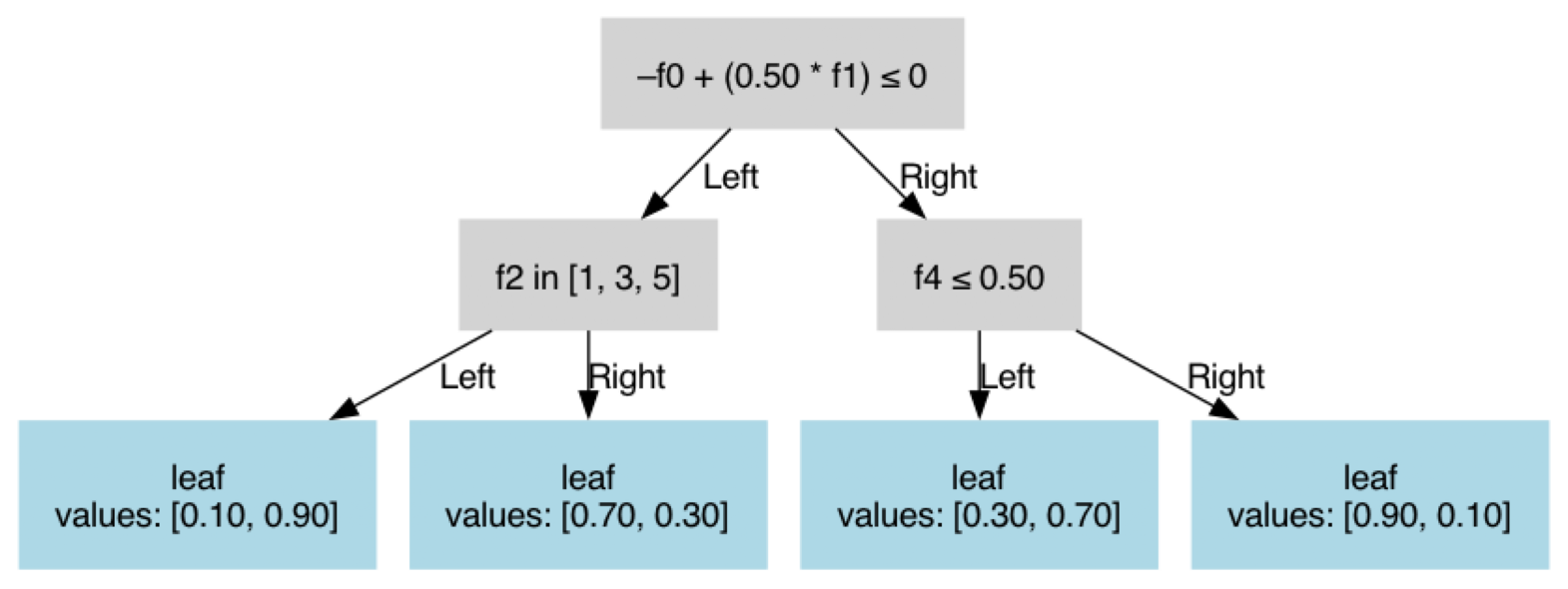
Here is a complete example combining all split types:
{
    "params": {
        "task": false,
        "n_classes": 2,
        "n_features": 5
    },
    "tree": {
        "is_leaf": false,
        "is_oblique": true,
        "weights": [-1.0, 0.5],
        "features": [0, 1],
        "threshold": 0.0,
        "left": {
            "is_leaf": false,
            "is_oblique": false,
            "feature_idx": 2,
            "category_left": [1, 3, 5],
            "missing_go_left": true,
            "left": {
                "is_leaf": true,
                "value": 0.9
            },
            "right": {
                "is_leaf": true,
                "value": 0.3
            }
        },
        "right": {
            "is_leaf": false,
            "is_oblique": false,
            "feature_idx": 4,
            "threshold": 0.5,
            "missing_go_left": false,
            "left": {
                "is_leaf": true,
                "value": 0.7
            },
            "right": {
                "is_leaf": true,
                "value": 0.1
            }
        }
    }
}
from obliquetree.utils import load_tree, visualize_tree

clf = load_tree("custum_tree.json")
visualize_tree(clf, show_node_value=False, show_gini=False, show_n_samples=False)