Example Usage
This guide demonstrates how to use the obliquetree library’s Classifier for training decision trees with oblique splits and visualizing the results. The examples explore different configurations, including oblique and non-oblique splits, and highlight the library’s support for categorical data.
Imports
from obliquetree import Classifier
from obliquetree.utils import visualize_tree

from sklearn.datasets import fetch_openml
from sklearn.model_selection import train_test_split
from sklearn.preprocessing import StandardScaler, LabelEncoder
from sklearn.metrics import accuracy_score
Data Preparation
We use the “Adult” dataset from OpenML, apply preprocessing, and split it into training and testing sets.
RANDOM_STATE = 42

X, y = fetch_openml("adult", version=2, return_X_y=True)
y = (y == ">50K").astype(int)

cat_column = X.select_dtypes(exclude="number").columns
numeric_columns = X.select_dtypes(include="number").columns

encoder = LabelEncoder()
for col in cat_column:
    X[col] = X[col].astype(str)
    X[col] = encoder.fit_transform(X.loc[:, col]).astype(float)

X_train, X_test, y_train, y_test = train_test_split(X, y, random_state=RANDOM_STATE)

scaler = StandardScaler()
X_train[numeric_columns] = scaler.fit_transform(X_train[numeric_columns])
X_test[numeric_columns] = scaler.transform(X_test[numeric_columns])

cat_idx = [X_train.columns.get_loc(col) for col in cat_column]
Note
Scaling is important for oblique splits. Since obliquetree supports categorical data, we pass the indices of categorical columns via cat_idx.
Example 1: Oblique Tree with Categorical Support
clf = Classifier(
    use_oblique=True,
    max_depth=2,
    n_pair=2,
    random_state=RANDOM_STATE,
    categories=cat_idx,
)

clf.fit(X_train, y_train)

train_pred = clf.predict(X_train)
train_mse = accuracy_score(y_train, train_pred)

test_pred = clf.predict(X_test)
test_mse = accuracy_score(y_test, test_pred)

print(train_mse, test_mse)
Output:
0.8395075209521989 0.8513635246908525
Note
Here, n_pair=2 by default, meaning oblique splits are computed using only two features.
visualize_tree(clf)

Example 2: Axis-Aligned Tree with Categorical Support
clf = Classifier(
    use_oblique=False,
    max_depth=2,
    categories=cat_idx,
)

clf.fit(X_train, y_train)

train_pred = clf.predict(X_train)
train_mse = accuracy_score(y_train, train_pred)

test_pred = clf.predict(X_test)
test_mse = accuracy_score(y_test, test_pred)

print(train_mse, test_mse)
Output:
0.826704157680653 0.8381786913438702
Note
This configuration removes oblique splits but still supports categorical data. Random state is not required for axis-aligned splits.
visualize_tree(clf)

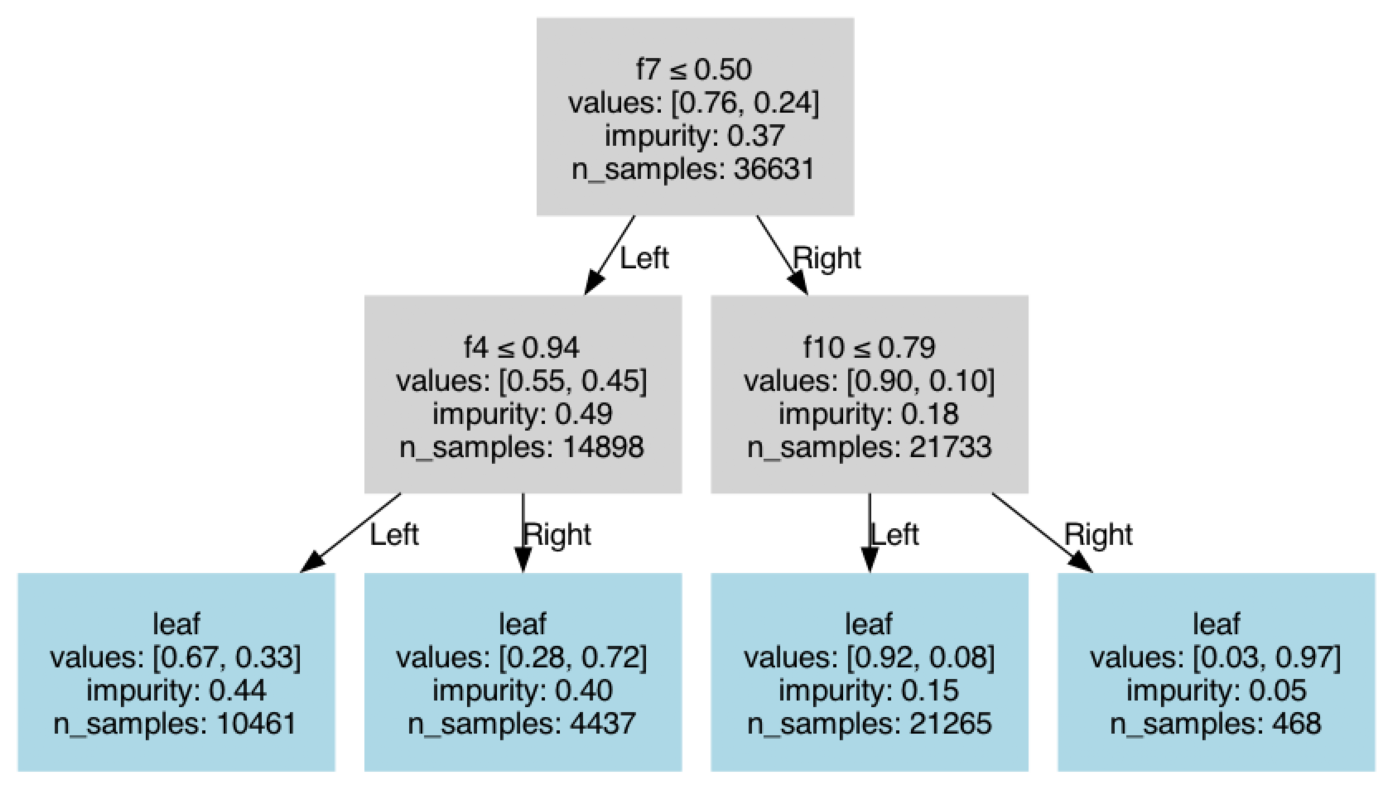
Example 3: Axis-Aligned Tree Without Categorical Support
clf = Classifier(
    use_oblique=False,
    max_depth=2,
)

clf.fit(X_train, y_train)

train_pred = clf.predict(X_train)
train_mse = accuracy_score(y_train, train_pred)

test_pred = clf.predict(X_test)
test_mse = accuracy_score(y_test, test_pred)

print(train_mse, test_mse)
Output:
0.8238923316316781 0.8340021292277455
Note
In this configuration, both oblique splits and categorical support are disabled,
yielding results consistent with standard scikit-learn trees.
visualize_tree(clf)
Example 4: Oblique Tree with n_pair Set to Total Features
clf = Classifier(
    use_oblique=True,
    max_depth=2,
    random_state=RANDOM_STATE,
    n_pair=X.shape[1],
    categories=cat_idx,
)

clf.fit(X_train, y_train)

train_pred = clf.predict(X_train)
train_mse = accuracy_score(y_train, train_pred)

test_pred = clf.predict(X_test)
test_mse = accuracy_score(y_test, test_pred)

print(train_mse, test_mse)
Output:
0.84021730228495 0.8489886168208992

UserWarning: Total features: 14, categorical features: 8. n_pair (14) exceeds the usable features, adjusting n_pair to 6.
Important
When n_pair exceeds the number of usable features, the library automatically adjusts it. Oblique splits do not support categorical features directly, so the n_pair count is reduced.
visualize_tree(clf)
